
AI-first creation
Generate and revise project elements with an AI Agent that works with the surrounding app context.
FlutterFlow is an established visual builder for Flutter. FlutterPilot takes a different route: AI generation, a visual editor, and app logic in one Studio, with Flutter source export. Here is how the two compare, and how to test both on a real screen before you switch.
FlutterFlow details below come from its official documentation. Check current plans on flutterflow.io.
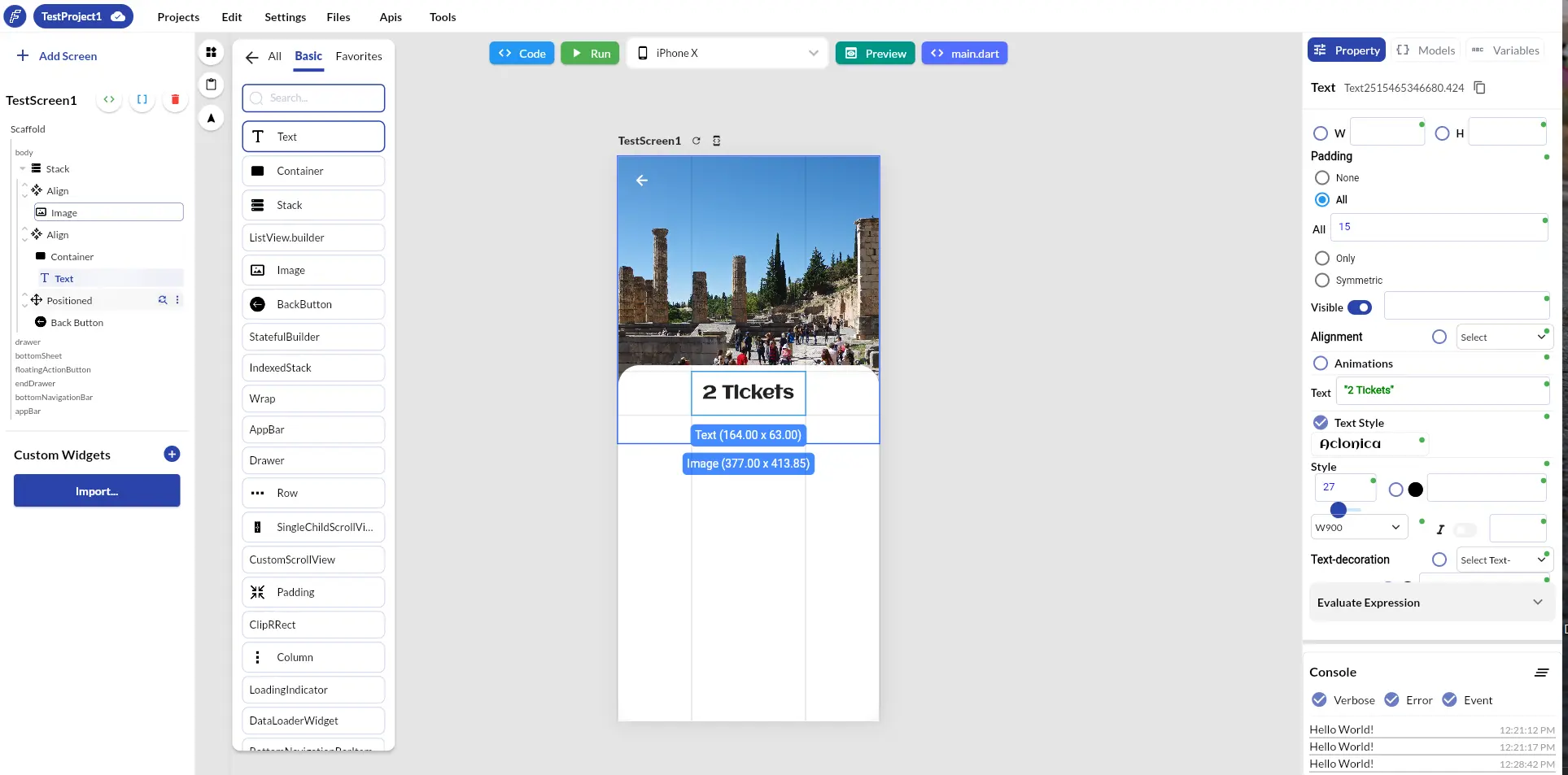
A visual workflow with a direct path to the Flutter project underneath.
Visual editors can look similar in a feature checklist. The more important questions are how quickly you can reach a useful first draft, how deeply you can customize it, how data and behavior fit together, and what happens when you need the source outside the platform.
Both tools build Flutter apps visually and both use AI. The differences are in approach and maturity, not in a checklist of yes/no features.
| What to compare | FlutterPilot | FlutterFlow (per its documentation) |
|---|---|---|
| AI generation | AI project creator for multi-screen Starter Apps, plus a project-aware AI Agent (labelled Beta) that creates and revises screens, components, variables, and endpoints. | Generates pages and components from natural-language prompts and can import a Figma frame; AI coding agents are available from its desktop app. |
| Visual editing | Widget tree, widget palette, device canvas, and property panel for Flutter widgets. | Visual editor for composing Flutter widgets with a widget tree and properties panel. |
| Custom code | Custom Dart code in action flows, Dart expressions in any property, and reusable custom components. | Custom functions, custom actions, and custom widgets in Dart, with pub.dev package dependencies. |
| Data and APIs | REST endpoints (manual or Postman import) with mock responses and local collections, plus Google Sheets with schema inference, Firebase, and Supabase (Beta). | Firebase and Supabase integrations, including built-in Supabase database and authentication actions. |
| Code export | Complete Flutter project ZIP from Export & Publish, with export validation. Exporting doesn't use credits. | Code download through the FlutterFlow CLI or the Developer Menu; its documentation lists code download as a paid-plan feature. |
| Pricing model | Pay-as-you-go credits with no subscription: AI generation from 1 credit per screen, Android APK builds 3 credits, web publishing 5 credits. | Subscription plans; see its plans and pricing page for current tiers and what each includes. |
| Maturity and ecosystem | A younger product: guides on this site and inside the Studio, plus release notes. | An established product with extensive documentation and a community forum. |
FlutterFlow sources, checked October 19, 2026: FlutterFlow: pages and AI generation · FlutterFlow: toolbar and AI agent · FlutterFlow: widgets · FlutterFlow: writing custom code · FlutterFlow: Supabase database actions · FlutterFlow: exporting code with the CLI · FlutterFlow: plans and pricing. FlutterFlow is a trademark of its owner; this page is not affiliated with or endorsed by FlutterFlow.
Build the same small slice of your app in each tool. An afternoon of this tells you more than any feature list.
Choose something real, such as a searchable list that opens a details page.
Start from the same prompt or Figma frame, then finish the details visually.
Navigate to the details page with an argument and update some state on the way.
Use your actual REST endpoint or database rather than sample data.
Compare the phone, tablet, and desktop layouts each tool produces.
Open each exported project locally, run it with your Flutter toolchain, and review the structure with your team.
Generate and revise project elements with an AI Agent that works with the surrounding app context.
Adjust Flutter widget structure and properties while keeping a live preview close at hand.
Export the project when you want local control, custom implementation, or your established toolchain.
Create and test endpoints, import Postman collections, and bind results into the interface.
Keep navigation, state changes, conditions, and dialogs alongside the screens they support.
Preview form factors, deploy a Flutter web build, or continue from exported source.
FlutterPilot is worth evaluating if your team wants an AI-assisted visual workflow, expects custom Flutter work, or wants a clear source-code handoff.
No. FlutterPilot takes its own approach, centered on project-aware AI, visual Flutter editing, connected workflows, and source export.
Yes. Export & Publish produces the complete Flutter project as a ZIP that you can open and run with your own Flutter toolchain.
There is no importer for FlutterFlow projects. Rebuild the screens you need, using Figma import (Beta) or AI generation to speed up the first draft.
Plan it screen by screen: recreate each screen from a prompt, a Figma frame, or a template; reconnect data through REST endpoints, local collections, or Firebase and Supabase (Beta); rebuild actions and navigation in action flows; move custom code into custom Dart actions; then export the project and compare it with your FlutterFlow export before switching.
FlutterPilot has no subscription: you buy credits for AI generation and cloud builds, and exporting the Flutter project doesn't use credits. FlutterFlow sells subscription plans, and its documentation lists code download as a paid-plan feature. Check both products' current prices before you decide.
Test a real screen, a real interaction, one data flow, responsive behavior, reusable components, collaboration needs, and the exported project—not only the demo experience.
Start in the browser, refine the project visually, and export Flutter source when it is ready for your workflow. Prefer a head start? Browse Flutter app templates.